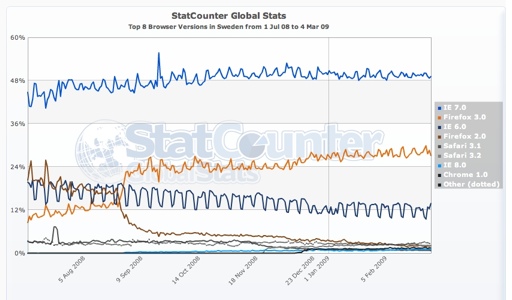
I looked at some browser stats at StatCounter.com today: trends in browser and OS market share for various regions and countries. In addition to the distressingly high level of IE6 usage out there (IE6 is a pain to work with, from a web developer point of view), another slightly interesting pattern appeared: IE6 usage dips significantly during weekends, when people go home and use whatever browser they want. It’s all those slow-moving foot-dragging corporations who keep using it. And since our product is aimed at the corporate market, we’ll be stuck with supporting IE6 for a long long time still.

I like the idea of having all my data online, accessible anywhere from any computer with an internet connection. But I don’t trust online services enough to actually store anything even remotely important there, without a local backup.

Online service providers have bad policies that make them lose your data, or go bankrupt and sell all their hard drives.

Flickr is fine for publishing photos, but not for a photo archive, and the same with delicious.com for bookmarks. This is also why I don’t use GMail or Google Reader. In fact I haven’t even tried GMail because I know that I will not use it. I don’t trust toomik.net 100% either: every so often I make a local backup of my blog.

Better safe than sorry.

The Steve rule states that every group of fifteen or more programmers will have more guys with the same name than women. Yesterday’s event fulfilled not just the Steve rule, but the Steve rule squared. Not only were there more guys with the same name than there were women (which isn’t hard) – there were more such name groups than there were women. The participant list showed 3x Anders, 3x Joakim, and a few 2-name groups – and one single woman.

I’d expected to be in a minority but not that extreme!

Yesterday I attended an “unconference” organised by the Swedish ALT.NET group. An unconference is like a conference except it’s free, informal and mostly self-organizing.

This unconference had two parts: first a series of “lightning talks”, i.e. brief presentations of up to 10 minutes, and then an “Open Space”, i.e. a set of self-organizing discussions. (The Wikipedia page explains quite well how the “self-organizing” part works, and it actually worked surprisingly well.)

Both parts were fruitful and interesting. The lightning talks were a good way to get started and to get our brains moving, but the bulk of the action happened in the Open Space discussions. The topics ranged from Domain-specific languages through Traditional roles in Agile projects to Working with legacy code.

I wanted to take part as a pig rather than a chicken, to use a Scrum metaphor, so I held a talk myself, about continuous integration – how we’ve implemented it in our project, and why I think it’s the greatest thing since sliced bread. Apparently I made an impression on at least one listener.


I got somewhat spoiled at my previous job. At a global firm with a large number of excellent developers, there were always presentations to attend, debates to follow, people to learn from. Now that I work in a very small team of rather more ordinary developers, I don’t get that kind of inspiration and information served on a silver platter any more, and need to look for it more actively.

I’ve also come to realise that I care more about code quality and good design than the rest of my team, and sometimes the uphill struggle against a morass of ugly old code gets a bit demoralizing. It was nice to meet people whose values and ideals are more aligned with mine, and who grapple with similar problems.

I went home yesterday with two book tips, one tool to try out, some good advice, and a renewed sense of energy and inspiration. I’m looking forward to the next ALT.NET event already!

I’ve spent the last few evenings moving all my stuff from the old PC to the shiny new Mac, which has generally gone more smoothly than I expected. Opera is up and running, with all my bookmarks and email and RSS archive. Today I got Opera’s list of saved passwords moved as well, so I can now blog again! (For almost all web sites I rely totally on Opera to remember my passwords, and haven’t memorised anything, so without it I’d have to look them up every single time.) Moving Mozy from a PC to a Mac was relatively straightforward, too.

However I have concluded that NeoOffice is not an acceptable substitute for Office – slow to start, spreadsheets look horrendously clunkily ugly, and it cannot deal with .mdb files. I guess I will need to install Office (which means installing a Windows VM, because I’m not going to buy another version of Office).

Also I’ve realised that using iPhoto, which people generally say good things about, for managing my photos is pretty much out of the question. It threw all my 8000 photos into a single bucket, keeping only one folder level, which meant it was almost impossible to work with the files. I’m going to take a closer look at Picasa and see if there are any other contenders out there. Absolute must-haves include working with my existing folder structure, and good tagging support.

Actually, the Mac arrived on Saturday, but I haven’t had a chance to unpack it. Now I’ve actually opened the box and turned it on. It’s a joy to look at, outside as well as inside. I’ve never had that feeling with a computer before.

But I really feel like a novice: I don’t know how stuff works, I lose my windows, I’m sometimes not sure whether an application is running or not (or whether it even matters) and I know no keyboard shortcuts.

Now comes the hard slog of migrating all my documents (mostly photos), my RSS and mail archives, and my bookmarks. But not today.

I considered switching to Mac Mail, but now I’m leaning towards keeping Opera after all, mostly because no straightforward migration path seems to exists. And I’m very used to Opera, and quite happy with it. Perhaps I’ll look again later, after I’ve moved everything from the PC to the Mac. Or I might keep just my archives in Opera and use Mail for all new stuff?

I sort of decided what laptop to buy. It will be a Mac, and very probably a MacBook rather than a MacBook Pro. I don’t think the extra power of a Pro is worth 6000 extra kronor. The one thing I’m not sure about is screen size: MB with 13.3″ might feel small, perhaps the MBP with 15.4″ would be better? I’ll have to look at them both in real life before I can make a final decision.

In fact I don’t even need the highest-spec MacBook: 160GB hard drive is more than enough for me, given that I have used about 35GB on my current hard drive.

I found a blog post about pair programming. The post itself wasn’t anything special (talking about how the names Pair Programming and especially Extreme Programming might scare away conservative managers). But I found the comments interesting, and I could really sympathise with several of the commenters who do not like pair programming.

I have tried pair programming a few times. It works (from my point of view) when both of us are roughly on the same level, and only when there is a problem that clearly needs more than one pair of eyes, because it’s risky or complicated. It’s worked well for some tricky SQL queries, as well as for a complex web page (a mixture of UpdatePanels, Repeaters, and javascript with embedded C# code blocks).

If the other developer is clearly more junior than me, pair programming kind of works as a method for knowledge sharing. I could get the job done noticeably faster on my own, but then we’d need additional time for handing over or explaining what was done, so the two might as well get done together. In those cases pair programming should be considered as a teaching/learning method rather than as a programming method.

But I do not like to do it for general run-of-the-mill coding – there has to be a specific reason for it.

Saying you should pair program “just because” is an inflexible approach, sort of like saying “hammer works for nearly any purpose”.

I do not need another person to help me focus (which is one of the advantages often mentioned). On the contrary, if someone is looking over my shoulder while I code, it really distracts me. Whereas if I am looking over someone else’s shoulder, I get incredibly frustrated by how inefficiently they work – because almost always they will be inefficient compared to my standards. They don’t know their tools, they don’t use keyboard shortcuts, they type slowly and carelessly. And I sit there and wait and sigh quietly.

I imagine I would enjoy pairing with an experienced and efficient programmer, but there aren’t any where I work – there’s no one more experienced than me. This is actually the greatest drawback of this job. I have no one to learn from; I can only learn by doing and by reading, and that’s only going to take me that far. I am a big fish in a small pond, whereas I would much rather be a tadpole in a big pond.

I like working with good tools. Work is more fun when I feel that the tools I have make work go faster and more smoothly, and give better results. It’s important to me that the kitchen knives I use have a good edge, that the chopping board is solid, that my pruners are sharp and the cleaning cloths are absorbent. I do not understand how people can make do with dull knives and cheap plastic chopping boards.

Likewise I like to work with good software. I need good software. I don’t understand how people can stand having Notepad as their text editor, not because they are uninformed and believe that Notepad is all there is, but because they can’t be bothered.

My two latest favourites are Selenium and SourceMonitor.

Selenium is a tool for testing web applications. Very easy to get started with, powerful, and flexible.

It’s got a “recording” module which records your actions in Firefox – what pages you open, what links you click, what text you type – and also lets you easily specify test conditions such as “verify that, after I’ve clicked all these things, this particular text is present on the page. You can save the tests in html format, and the file structure is so simple that anyone can edit and extend the tests. But you can also export the tests in your favourite programming language, or, if you prefer, write the tests from scratch in that language.

I used the Firefox addon to record the first tests and exported them to C#, and then went on writing the rest of the tests directly in C#. The whole process was very straightforward. We now have about 45 automated tests for core high-level functionality.

Plus, it’s free!

SourceMonitor is a tool for estimating code complexity. It is also free.

I’m very aware that our code needs refactoring, because large parts of it are so complex that they are effectively unmaintainable. But because everything needs refactoring, and I’m still not familiar with all of the code (because it is so hard to read), I don’t know where to start.

SourceMonitor has been very helpful for finding the hot spots, for prioritising the files and methods that are in most urgent need of cleanup. It quickly shows which files and methods are largest or seem most complex. It can sort them by size, complexity, levels of nesting, number of calls out to other methods, etc. This can be done for the project as a whole, or for a particular file. SourceMonitor also saves the results of each analysis run, so you can see how things change over time. I like seeing measurable progress, so this feature really appeals to me. There is something immensely satisfying in knowing that I have just reduced the size of our code base by 400 lines and at the same time made it better.

Before choosing SourceMonitor I also looked at FxCop and NDepend, but both were too complex for our current needs, and did too much. We’re nowhere near the level of control that these two applications provide, such as enforcing naming rules. I expect that I’ll try them again in half a year’s time. I might have chosen NDepend anyway, because the demos look so slick, but it costs money, and given how little of its functionality we will use for now, I would find it hard to justify the cost.

FxCop is free just like SourceMonitor, and I did try it out, but it was not particularly easy to get started with. The main hurdle was that FxCop needs compiled assemblies to work with, which makes it very difficult to use with ASP.NET web sites. SourceMonitor analyzes source code instead. I also found SourceMonitor’s sparse interface much more comfortable on the eyes and the brain than FxCop’s flood of messages.

Yesterday and the day before were the two most boring days of coding I have ever experienced. I hope I never have to do anything like this again…

We’re reviewing our database access code and decided to switch from executing plain SQL statements and stored procs, to using parameterised queries. In practice this meant replacing a method that built SQL statements as strings, with one that created SQL commands, and replacing all calls to the previous method with calls to the new one.

Because the new method returns a different data type, we couldn’t automate this. Each method call had to be changed manually.

Unfortunately the various previous developers did not believe in having a separate data access layer, so there is data access code everywhere. And I mean literally everywhere: every single aspx file has at least one, and often up to 10 database calls.

This led to a sum total of exactly 879 method calls that had to be changed. Manually. One by one. It took me most of Thursday and half of Friday to slog through them all. That’s more than 80 method calls per hour, or one every 45 seconds.

The only good thing about this (apart from making the application more secure) is that we are now even more convinced that we need to refactor this beast into a more manageable shape, and sooner rather than later.